
Q: Gmail sign-in permissions in an endless loop?
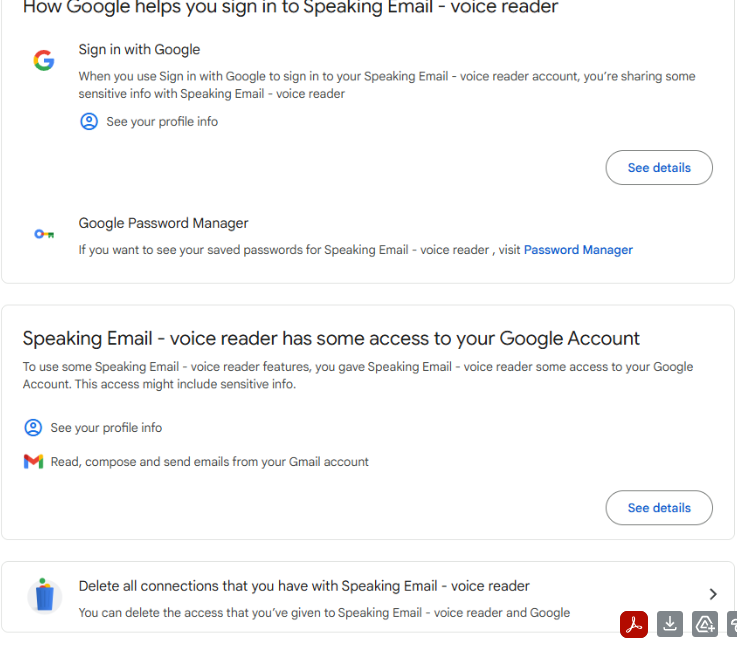
When signing in with Gmail, Google shows the permission screen. After signing in and accepting the prompts, you are returned to Speaking Email, which reports that it does not have the required permissions and sends you back to Gmail again. This repeats in an endless loop.
This is a problem with an unclear permissions prompt in the Google screen. If, during the first consent attempt, the checkbox allowing Speaking Email to access your emails is not selected (it is easy to miss), Google can save a partial permission. On later attempts, Google may no longer show the checkbox, making it impossible to grant the missing permission.
A: How to fix

What is Speaking Email CarPlay?
An app for iPhone and Apple CarPlay that reads your email out loud to you. It intelligently extracts content from emails (minus the signatures, disclaimers and threads). And it lets you action your email - archive, mark-as-read, trash, flag - using the CarPlay interface controls. It works Office 365 and Gmail email accounts, as well as most other providers including any standard IMAP server.
Who is it for?
People who are busy and run out of time to get through their inbox. People who want to make productive use of time when driving between appointments.
What if I don't have CarPlay?
See our other product Speaking Email for iPhone and Android for anyone who doesn't have CarPlay.
Is is free?
Yes it is free to download and you can do a lot with the free version. Free features:
- Email text-to-speech (TTS) with smart content detection (this is awesome, you will be blown away!)
- CarPlay buttons next/prev, archive, flag, delete
Do I have to upgrade?
Nope, but you can upgrade for:
- Multiple accounts
- Attachment reading
- Voice commands (you will love this!)
- Dictation - reply/forward/compose (you will love this even more!)
